Tuesday, 9 September 2014

Free Signed SSL Cert

I run a few things on an Ubuntu server sitting under my desk at home and have used self-signed certificates usually, but there are free Certificate Authorities including startssl.com which are readily available for personal use like running your ownCloud.

Here's a good write-up on how to do this in Ubuntu:

https://gist.github.com/mgedmin/7124635

And the results look swell:SSL Labs

/etc/apache2/sites-enabled/ssl

NameVirtualHost *:443
<VirtualHost *:443>
        SSLEngine On

        SSLProtocol all -SSLv2
        SSLCipherSuite ALL:!ADH:!EXPORT:!SSLv2:RC4+RSA:+HIGH:+MEDIUM
        SSLCertificateChainFile /etc/apache2/ssl/sub.class1.server.ca.pem
        SSLCertificateFile /etc/apache2/ssl/alia.thenibble.org.crt
        SSLCertificateKeyFile /etc/apache2/ssl/alia.thenibble.org.pem

        DocumentRoot /var/www/

        ServerAdmin webmaster@thenibble.org

...

Saturday, 12 July 2014

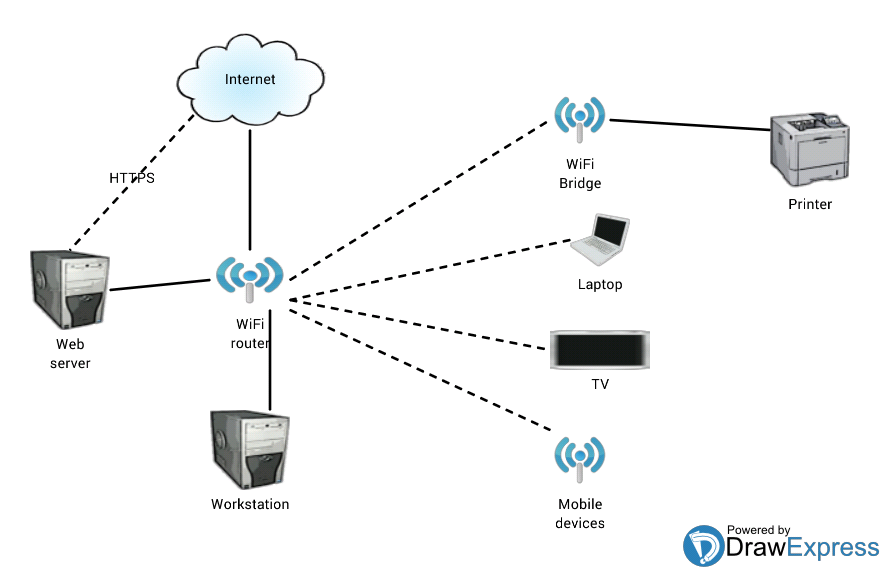
Home network

I'm putting together a diagram of my home network, it may take me a couple passes... Here's a quick drawing made on my tablet.


Tuesday, 29 April 2014

Partitioning with parted for LVM

Disk partitioning and volume management can be complicated like when you've got disks in RAID groups carved into LUNs connected via fiber channel to a NAS which is pooling the LUNs and then creating file systems and then sharing NFS to VMware hosts which is creating virtual disk files which the guests see as local disks which they can then partition and add them as physical volumes to volume groups carved into logical volumes which are then formatted with file systems and mounted before you can finally start storing some files... And changes are done online.

Now I've written about LVM before (http://archangel.thenibble.org/2010/11/disk-management-with-logical-volume.html) and to re-iterate, if you're using any main GNU Linux distro, you should use LVM.

Skipping the SAN, NAS, and virtual layers, when adding a new local disk, general practice is to create a partition on that disk with "parted" and add that partition as a PV (rather than doing a whole disk which can be harder to resize for LVM). With parted, create "GPT" partition tables instead of DOS as GPT will work for all drive (partition) sizes. Partition sizes can also be given in percentage which is useful both for the start of the disk which automatically aligns the partition as well as for the end of the disk to use all available space.

Example session:

# parted /dev/sdc
GNU Parted 2.1
Using /dev/sdc
Welcome to GNU Parted! Type 'help' to view a list of commands.
(parted) mklabel
New disk label type? gpt
(parted) mkpart
Partition name?  []?
File system type?  [ext2]?
Start? 0%
End? 100%
(parted) set
Partition number? 1
Flag to Invert? lvm
New state?  [on]/off?
(parted) p
Model: VMware Virtual disk (scsi)
Disk /dev/sdc: 53.7GB
Sector size (logical/physical): 512B/512B
Partition Table: gpt

Number  Start   End     Size    File system  Name  Flags
 1      1049kB  53.7GB  53.7GB                     lvm

(parted) q
Information: You may need to update /etc/fstab.

# pvcreate /dev/sdc1
  Physical volume "/dev/sdc1" successfully created

... vgcreate / vgextend, lvcreate, mke2fs, and so on.

Ciao

Wednesday, 12 March 2014

Squid Proxy and WCCP

The last few days I've been struggling to get a transparent proxy setup for our network using WCCP from our Cisco ASA firewall to a Squid proxy.


I had a hard time getting my Squid proxy handling transparent caching from our Cisco ASA with WCCP(2), mostly with getting the GRE working. I was working mostly with this page:


The biggest confusion for me was that the GRE was not a point-to-point tunnel. In the end it was working as a sort of pseudo interface to handle the GRE encapsulation and the NAT redirection pushed packets through that interface as the glue.

“modprobe ip_gre”

This creates a generic GRE tunnel gre0; which you can see with “ip tunnel”. Load this module on boot. With CentOS and other RedHats

echo modprobe ip_gre >> /etc/rc.modules
chmod +x /etc/rc.modules

An IP interface needs to be brought up for gre0, but doesn’t have to connect to anything. Many examples I saw used a localnet address like 127.0.0.2. I used the following (no 172.16.x.x in my network, it’s a dummy address):

/etc/sysconfig/network-scripts/ifcfg-gre0
DEVICE=gre0
BOOTPROTO=static
IPADDR=172.16.1.6
NETMASK=255.255.255.252
LOCAL_DEVICE=eth0
ONBOOT=yes
IPV6INIT=no

Lastly iptables glues the GRE to Squid (we use 10.x.x.x addresses for our network):

cat /etc/sysconfig/iptables
# Generated by iptables-save v1.3.5 on Tue Mar 11 15:45:13 2014
*nat
:PREROUTING ACCEPT [26:6791]
:POSTROUTING ACCEPT [86:5532]
:OUTPUT ACCEPT [86:5532]
-A PREROUTING -s 10.0.0.0/255.0.0.0 -d ! 10.0.0.0/255.0.0.0 -i gre0 -p tcp -m tcp --dport 80 -j DNAT --to-destination $HOST-IP:$SQUID-PORT
COMMIT

Rp_filter disabled and ipforwarding enabled as indicated in the document.

And Bob’s your uncle!

Sunday, 15 December 2013

MySQL Replication

MySQL replication is very flexible for running multiple servers. Most MySQL administrators should already have a copy of "High Performance MySQL" (); if you don't, get this book as it is top notch and will guide you through most configurations imaginable. Rather than repeat what is already written, here's a few things I've found that can help make things simpler.

There are a few things with replication you need to be attentive to.
  • Set a unique "server-id" for each server
  • Keep your binary logs (and relay logs) with your databases
  • Initialize your slave cleanly
  • Run your slave "read-only" 
  • Use "skip-slave-start" if the slave is used as a backup

Figure out a scheme to create a unique "server-id". If your database hosts all have unique number in their name, you could use that. I've been using their IP addresses converted to decimal (IP Decimal Converter). Even if you're aren't thinking about master-master or many slaves configurations today, starting with this set will save you the trouble later of having to reinitialize everything.

Unlike best practices on other platforms like SQL Server, with MySQL it is going to be simpler to keep the binary logs with the databases. Like if you try to initialize slaves with LVM snapshots, capturing binary logs with databases in one snapshot is going to be the best. And moving binary logs later is a challenge. So for the "log-bin" and "relay-log", set these to a file name only and not a full path ("mysql-bin", and "<hostname>-relay-bin").

 Create a script to (re)initialize a slave. If your environment is on the messy side and there's a lot of strange things that people are doing in the databases, you are going to find your slave is at risk of getting out of sync with the master. I would suggest re-initializing the slave(s) as often as possible, like monthly. Even if your environment is pristine, you will inevitable make changes from time to time and will want to have had a consistent tool for initializing slaves. Again, "High Performance MySQL" has several good ways of doing this. LVM snapshots and rsync are what are in my scripts. The Percona Toolkit (including the former Maatkit) also has some good tools for you.
Running a slave in "read-only" ensures only "root" can make changes which helps ensure the slave integrity. If you want to have a writable slave, e.g. one out of sync with the master, why use replication? Load data as needed and skip the whole replication thing. Even so, very bad schema (like tables with no unique keys) are still susceptible to falling out of sync as replicated transactions may not behave consistently. There may be other reasons for slaves to fall out of sync, but this has been my problem so I couldn't attribute any out-of-sync issues to anything else.

For a server that is intended to be the backup of the primary, the "skip-slave-start" is necessary for the times you do use the backup server. It means every time you restart MySQL, you have to manually issue "start slave" which prevents the backup server from downloading transactions from the primary server like after you have made a cut-over and are trying to restore the primary.

Wednesday, 27 November 2013

Monitoring Network Traffic at Home

Since the news last week about LG "smart" TVs ignoring privacy settings and sending all your viewing and media information to LG, BBC News LG investigates Smart TV 'unauthorised spying' claim, I started looking at increasing monitoring of network activity at home and see what my Wii or Sony Blu-ray player or other devices are up to.

Virtually any router allows you to enable SNMP which is enough to collect aggregate interface traffic. I have been using Cacti for recording traffic for years.

What I've found is that DD-WRT has something called "rflow" to send live packet information to a monitoring server - an equivalent of Cisco NetFlow. The Network Traffic Analysis With Netflow And Ntop guide is very good, and on Ubuntu the ntop server is readily available. This gives a live view of what systems are connecting to what, how much traffic is passing on different protocols and top users. Great if there's any question of who is hogging all the tubes.

But not enough to tell if your "smart" DVD player is reporting to Sony that you enjoy "midget porn" in the privacy of your own home (I'm not judging; that was the example in the BBC article). For that, I will need to look at some bigger iron - Snort to really go whole hog.

Wednesday, 17 July 2013

Simple web page for generating passwords

I find it annoying not to have APG handy when I want to create a password. I also don't like using random websites online for this either because I can't trust that they aren't logging their output. So I put a simple little form and using PHP to invoke APG to create passwords. My form right now is very simple and doesn't support all of the APG options, but it will do:

https://alia.thenibble.org/passwords/

Here's the simple code I'm using:

https://docs.google.com/document/d/12CViQAEW6q2moZ4GtkJllsD0-8pazpVMfeYjlrBz-4s/pub

Popular Posts